August 2025 I picked up a Starlink Mini with Roam service - astonished at the performance. First time I tried it in southeast Oregon, I placed it on the dashboard while parked under a tree and the GMC's big windshield was facing north. I didn't expect it to work at all but it did just fine so I left it that way. Next morning (still on the GMC's dash) I connected while having breakfast inside a restaurant 100 feet away. Worked fine on the road regardless of travel direction - still sitting on the dash. I'll install it on the roof when I have time.
My current Internet + TV streaming implementation
- Thread starter Christo
- Start date
You are using an out of date browser. It may not display this or other websites correctly.
You should upgrade or use an alternative browser.
You should upgrade or use an alternative browser.


I need to check eBay to see if anyone is selling a Mini cheap....August 2025 I picked up a Starlink Mini with Roam service - astonished at the performance. First time I tried it in southeast Oregon, I placed it on the dashboard while parked under a tree and the GMC's big windshield was facing north. I didn't expect it to work at all but it did just fine, so I left it that way. Next morning (still on the GMC's dash) I connected while having breakfast inside a restaurant 100 feet away. Worked fine on the road regardless of travel direction - still sitting on the dash. I'll install it on the roof when I have time.


All I can find is that offer is for the Gen2 kit. Not the Mini, which is listed for $499.Necro-posting because the topic exists...
Starlink is currently offering the 3rd Gen starter kit for $175 (Best Buy or direct). There is the unlimited data plan at $165/month, but there is also the 50GB plan at $50/month. After the first month you can put the plan on 'standby" at limited bandwidth for $5/month. Even on standby you can email, WiFi phone call (if allowed by your provider), video-call, and watch YouTube at 360p. So, for $175 one-time, $50 one-time, and $5/month thereafter you can have internet/calling available at all times from anywhere. When you need additional bandwidth you can activate the plan for a month.
My starter kit arrives Thursday (Sept 11, 2025).

I edited the original post to read "Standard Kit AX Tri Band Wi-Fi System". The person who turned me on to this offer called it the 3rd Generation, as do multiple recent YouTube videos. Apparently the WiFi router that ships with it is their 3rd Generation router (WiFi 6, tri-band, mesh capable); the standard antenna is in it's 3rd generation.All I can find is that offer is for the Gen2 kit. Not the Mini, which is listed for $499.
Looks like you can buy just the Mini antenna (with cables and mount) to replace the larger antenna for $300 at Walmart.com and other places. I'm still learning about the options and antennas available.... For instance, the "Performance" slim antennas, even though they ship with the Gen 2 router, are available in Gen 2 and Gen 3 as well. Looks like this will be a learning experience.

Last edited:
Bought my refurb Mini direct from Starlink at a $200 discount (refurb isn't always available). For new accounts, obtain a referral code from an existing Starlink customer and both parties receive credit for an additional free month of service.
I added $40 for an external Router Mini. Super easy setup - not necessary within a GMC but I used that to boost signal once I was set up at my destination in Nevada.
I added $40 for an external Router Mini. Super easy setup - not necessary within a GMC but I used that to boost signal once I was set up at my destination in Nevada.
Last edited:

I also have a Starlink, though the older gen.3 dish and hacked it to be hard mounted on the roof nice and flush using some 3D printed brackets so it can't even be easily seen. It was bit of a job but defo worth it - the mini can probably be mounted in a similar manner even more easily due to its new flat design.
I ran the cable into the van and converted the power to run off the 12v natively so it runs all the time into my router. Feels like I have a fibre connection even when driving. Its a v cool setup and I could never go back to just cellular ever again.
I ran the cable into the van and converted the power to run off the 12v natively so it runs all the time into my router. Feels like I have a fibre connection even when driving. Its a v cool setup and I could never go back to just cellular ever again.
Getting ready to look at mounting options. I've found multiple 3D print files. Did you modify yours to mold to the curvature of your roof? Would you be willing to share the file if so? Otherwise, I'll find a local "guru" to see if they can modify one of the files I found to follow the roof contour.I also have a Starlink, though the older gen.3 dish and hacked it to be hard mounted on the roof nice and flush using some 3D printed brackets so it can't even be easily seen. It was bit of a job but defo worth it - the mini can probably be mounted in a similar manner even more easily due to its new flat design.
I ran the cable into the van and converted the power to run off the 12v natively so it runs all the time into my router. Feels like I have a fibre connection even when driving. Its a v cool setup and I could never go back to just cellular ever again.
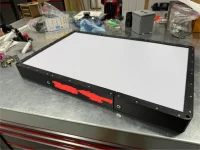
Two different options:
Mounting east/west in the space in front of the rear vent fan.
20/20 hindsight; I could have arranged those panels in a much better way. And gained another 190W in the process.


Attachments
Last edited:
Getting ready to look at mounting options. I've found multiple 3D print files. Did you modify yours to mold to the curvature of your roof? Would you be willing to share the file if so? Otherwise, I'll find a local "guru" to see if they can modify one of the files I found to follow the roof contour.
Two different options:
Mounting east/west in the space in front of the rear vent fan.
20/20 hindsight; I could have arranged those panels in a much better way. And gained another 190W in the process.
View attachment 17173
View attachment 17174
Hey Tybolt39
I put mine up on the roof early last year - there weren't as many 3D files available at the time and I used this Overlanders setup - he did a good youtube video on the whole process including wiring; His models are linked on his youtube video and are really nicely done - perfect fit.
I'm using the curved dishy mounted in this 3D printed frame. The Starlink fits without any need to allow for van curve on the centre section, its not really cuvered there, see below. I think even mounted sideways it would have been fine - just use more filler! My roof was not perfectly flat but fits fine with some extra sealant!
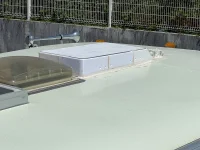
I drilled a hole through the roof under the mount for the cable to enter the cab roof panels which I could remove inside and routed the cable down to under my sofa. I then use a 12v PoE converter setup to run the whole thing on 12v natively, threw away the starlink router and ran it directly into my Peplink router setup. Its rock solid, 150-200Mbps Internet everywhere - even driving down the road is awesome. It does pull a few amps so if I'm off grid I'll turn it off at night to save some battery power.
Now that Starlink do the smaller flat version you could probably get away with that too. The curved dishy and hacking its leg off as shown in this video is a bit more involved, but this dishy does have slightly better throughput I'm lead to believe as its bigger, and the flat dish didn't exist when I did this anyway.
It doesn't matter which way its pointed, it doesn't care. The only thing to be mindful of is trees when you park up.
Not visible from the ground;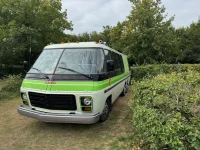
Having reliable Internet to research why you broke down is invaluable I find.

For those of you using the T-Mobile Sercomm G4SE gateway with a Waveform external antenna, I have a very important detail to share: The gateway will not switch to the external antenna unless it sees a 5G signal. So, if you're going to be out in the sticks where there's only a 4G LTE signal, be sure to hook up the antenna and switch over to it BEFORE you go to the area that doesn't have 5G coverage. This just happened to me and I had to drive the motorhome to a 5G area (thankfully only about 8 minutes away) to get the external antenna working. There's a note about this on the Waveform site. Hopefully TMo can/will fix this with a firmware update.